
How to migrate to the new Budgetdog personal budgeting template
If you're using an older version of the Budgetdog personal budgeting template, you can migrate your data to the new template in a few steps. This guide walks you through transferring your categories and transaction history.
The new template is formula-based, which eliminates duplication and improves data consistency compared to the old template. It's more stable and reliable overall.
Get your new template
Open the new Budgetdog template.
Click Use Template to create your new spreadsheet.
Copy your categories
Transfer your custom categories from your old template to the new one:
In your old template, open the Avery_Categories tab.
Select all data:
Press Ctrl + A (Windows) or Command + A (Mac)
Or click the top-left corner cell (intersection of row and column headers) to select everything:
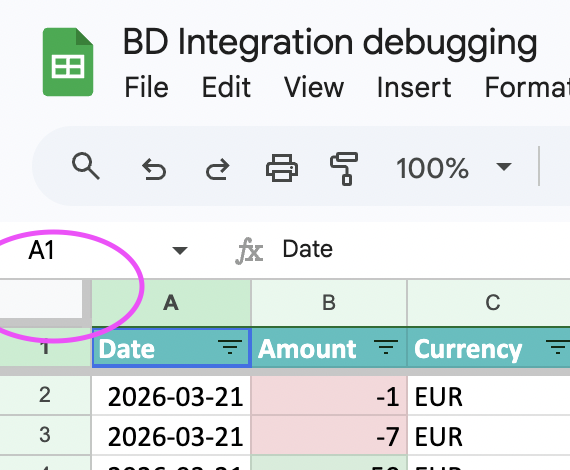
Press Ctrl + C (Windows) or Command + C (Mac) to copy.
In your new template, open the Avery_Categories tab.
Make sure the Avery sidebar is open.
Press Ctrl + A (Windows) or Command + A (Mac) to select all.
Paste values only using Ctrl + Shift + V (Windows) or Command + Shift + V (Mac).
Pasting values only preserves formatting and formulas in the new template. A regular paste may break the sheet structure.
Copy your transactions
Transfer your transaction history:
In your old template, open the Avery_Transactions tab.
Press Ctrl + A (Windows) or Command + A (Mac) to select all.
Press Ctrl + C (Windows) or Command + C (Mac) to copy.
In your new template, open the Avery_Transactions tab.
Press Ctrl + A (Windows) or Command + A (Mac) to select all.
Paste values only using Ctrl + Shift + V (Windows) or Command + Shift + V (Mac).
Next steps
After migrating your data:
Category names can only be edited in the Avery_Categories tab. If you want to rename or add categories, do it there.
Budget amounts can be adjusted in the Budget Expenses - Estimate tab. Input your budget amounts for each category there.
Check that transactions are categorizing correctly in Avery_Transactions > Column J. If transactions are miscategorized, see Reviewing and Fixing Your Budgetdog Template.
Set up rules to automate categorization going forward. See What is Rules Based Categorization?.
Questions? Reach out to [email protected].