
Understanding Avery's AI Auto-Categorization
Avery's AI auto-categorization uses artificial intelligence to automatically assign categories to your transactions based on their descriptions. This eliminates manual categorization work and keeps your financial records organized without effort.
How to Access
To use the AI auto-categorization:
Open your Avery spreadsheet
Go to Extensions > Avery in the top menu to open the Avery sidebar
Click on Quick Actions > Categorize Transactions
Click Auto-categorize
How It Works
Avery's AI analyzes transaction descriptions and intelligently assigns them to your existing categories. The system works through transactions in batches, learning from patterns to accurately categorize purchases, subscriptions, and expenses.
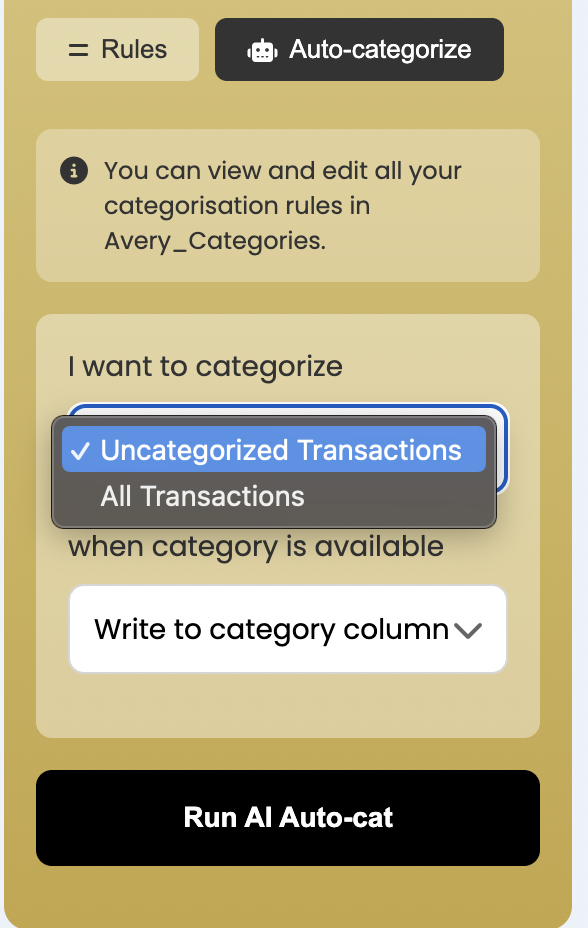
You can choose which transactions to categorize:
All transactions — Categorize every transaction in your sheet, regardless of whether they already have a category assigned.
Only uncategorized — Process only transactions that don't have a category yet, leaving your existing categorizations untouched.
Below is a screenshot showing the options
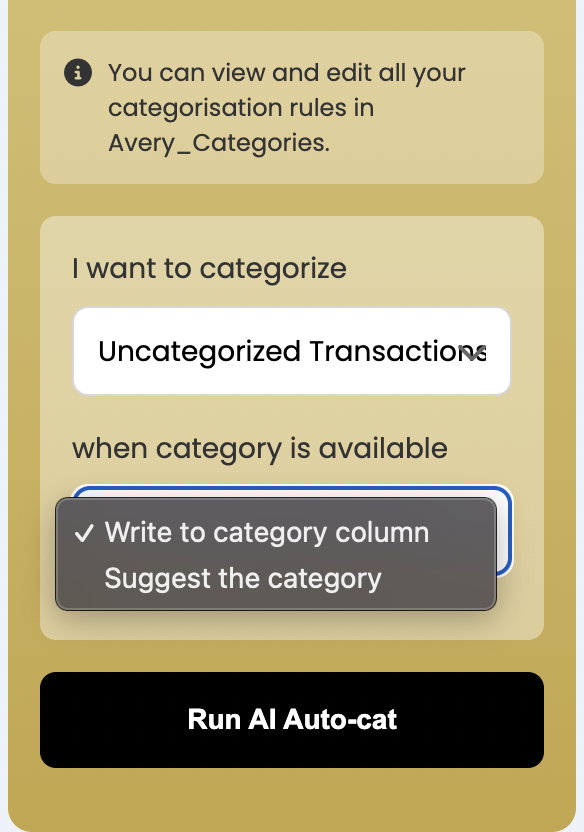
You can choose whether you want Avery AI to write categories directly to your transactions or suggest them first for review. Here are the two modes:
Write to Category column — AI directly assigns categories to your transactions, updating your Category column immediately.
Suggest Category — AI creates a new column with suggested categories instead of overwriting your existing data. This lets you review, compare, and approve AI recommendations at your own pace. You can accept all suggestions, cherry-pick individual categories that look accurate, or reject ones that don't fit. Once reviewed, copy approved suggestions to your main Category column or use them as a reference for manual categorization.
Below is a screenshot showing the options
Initial categorization takes a bit of time to process, especially if you have many uncategorized transactions. The AI works through your transactions sequentially to ensure accuracy.
Key Advantages
Save hours of manual work — No more going through hundreds of transactions one by one. The AI handles categorization automatically, freeing up your time for analysis and decision-making.
Ready records year-round — Your financial data stays categorized and organized automatically, making tax season and expense reporting effortless.
Works with your categories — The AI uses the categories you've already set up, so your existing budget structure stays intact.
For best results, make sure your category list is set up before running AI categorization. The AI will assign transactions to your existing categories.
When to Use It
AI categorization is particularly useful when:
You're starting with Avery and have months of uncategorized transactions
You've imported a large batch of new transactions
You want to maintain accurate records without manual effort
You need tax-ready bookkeeping throughout the year