
Avery & Budgetdog Integration FAQ
Getting Started with Avery
What is Avery?
Avery is a Google Sheets extension that automates expense tracking in the Budgetdog template. It connects to your bank accounts via Plaid (for North America) and GoCardless (Europe), pulling bank transactions directly into your spreadsheet to eliminate repetitive manual data entry.
What do I do after installing Avery?
After installing Avery from the Google Workspace Marketplace, make sure you have a copy of the Budgetdog template. Then access Avery through the Extensions tab in any Google Sheet to begin connecting your accounts.
If you need help setting up your Budgetdog template initially, check out our step-by-step setup guide.
Where do I access Avery?
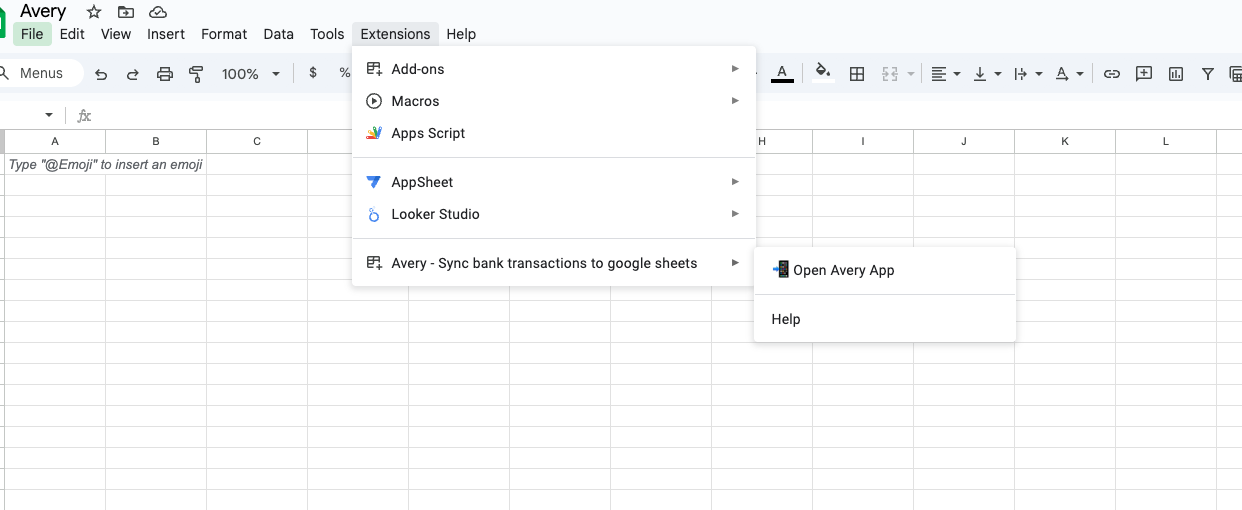
In Google Sheets navigate to the Extensions tab at the top menu. Avery will appear there after installation.
Is there an Excel version of Avery?
No. Avery is currently only available for Google Sheets. If you'd like to request support for other platforms like Excel or Airtable, email your feedback to [email protected].
Do not use the desktop version of Excel to access your Google Sheets budget. This can cause desynchronization issues. Always use Google Sheets through your web browser.
Bank Connections & Security
What banks and credit cards are supported?
Avery supports most major banks and credit cards in North America through Plaid. You can find the complete list of supported institutions on Plaid's website linked here. Note that bank connections can occasionally break and may require reconnection.
Does Avery connect to credit cards?
Yes, Avery connects to credit cards the same way it connects to bank accounts through Plaid's secure integration.
Is my data safe with Avery?
Yes. Avery uses Plaid and GoCardless for secure bank connections. Your transactions and sensitive information are not stored by Avery. The data flows directly from your bank to your personal Google Sheet.
How far back does Avery pull transactions?
Avery can pull transaction history as far back as the bank allows, the standard is normally 2 years. This varies depending on your specific bank's data availability.
Managing Accounts
How do I remove a connected account?
To remove an account, open the Avery sidebar in your sheet. Click the settings icon next to the account you want to remove, then select "Delete."

Can I rename a connected account?
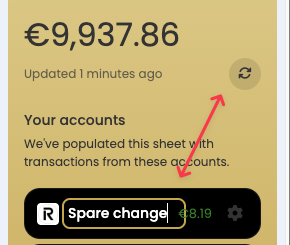
Yes. In the Avery sidebar, double click on the account name, you will see a small border around it and you can edit it to whatever name you you would like. Once you've typed your new name click anywhere outside the box and then click the refresh icon in the top right (the arrow below shows what it looks like)
Importing & Updating Transactions
My spreadsheet isn't updating. What should I do?
If your spreadsheet appears outdated, click the "Import Transactions" button in the Avery sidebar to manually trigger an update.
How do I turn on automatic updates?
In the Avery sidebar, navigate to Quick Actions > Auto Update Settings. Toggle the setting to "On," select your preferred update time, and save.
Avery automatically updates your transactions every 24 hours once auto-update is enabled, keeping your budget up to date.
A button in the app keeps spinning. What's wrong?
This usually happens when you're logged into multiple Google accounts. Ensure that the Gmail account you're using in your browser matches the account used in Google Sheets. Sign out of other accounts if necessary. This screenshot can help show where to look.
Categories & Budgeting
Where do I add additional categories?
Add new budget categories in the "Budgeted Expenses - Estimate" tab. Once added there, they will automatically appear throughout your sheet, including in the Avery transaction categorization options.
Learn more about working with categories in our guide: Using Categories in the Budget Expenses - Estimate Tab.
Can I add or remove budget categories?
Yes. You should ONLY EDIT your categories in the "Budgeted Expenses - Estimate" tab for expenses, or the "Additional Income & Expenses" tab for other items. Changes made here will auto-update throughout your entire spreadsheet.
Are we able to customize categories and have that update throughout the sheet?
Yes. When you edit categories in the "Budgeted Expenses - Estimate" tab, those changes propagate automatically to all other relevant tabs in your Budgetdog template.
NOTE: You can add more categories at any time but changing categories after importing can break your spreadsheet.
How do I quickly categorize uncategorized transactions?
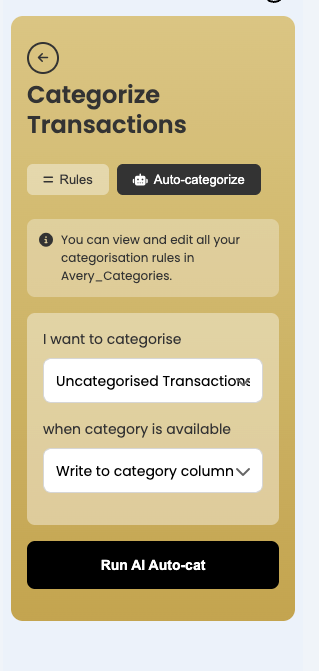
Open the Avery sidebar and use the auto-categorize feature for uncategorized transactions.
What happens when you leave the Avery Transaction category blank?
If you leave a transaction category blank in the Avery_Transactions sheet, that transaction will not copy over to your Monthly Actuals tabs or .
Does Avery automatically add columns if I add more categories than fit?
No. If you exceed the available category columns, Avery will sum the overflow amounts in the last column. You'll need to manually adjust your sheet structure if you need additional category columns.
Special Transaction Handling
Credit card payments are showing up as income. How do I fix this?
Mark these transactions as "IGNORED" in the Avery Categories column. You can also create categorization rules using keywords like "Thank you" or "Payment" to automatically ignore credit card payment confirmations. If needed, re-categorize the transactions and rerun the import.
Ignored items are still appearing in my Monthly Actuals. Why?
Make sure you're using the built-in "IGNORED" category (all caps) in your Avery_Transactions sheet. Transactions must be marked with this exact category name to be excluded from your Monthly Actuals.
Can I split a single purchase into multiple categories?
This feature is on the roadmap but not currently available. As a workaround, you can manually split transactions in your sheet by duplicating the row and adjusting amounts accordingly.
Can income be split into different categories (e.g., base pay vs. overtime)?
For splitting income types, use the "Variable Income" category to track different income streams separately.
How do I categorize transfers to IRAs or brokerage accounts?
Categorize these transfers under "Savings & Investments" in the Category Type dropdown. You can add specific account names in the "Additional Income & Expenses" tab to track individual investment accounts.
My paycheck posted in the wrong month (e.g., holiday early deposit). What should I do?
Ignore the early deposit transaction and manually record it as Variable Income in the correct month.
Troubleshooting
Avery isn't working, help!
If you encounter errors like "something went wrong" during import, try these steps:
Clear all data from the Avery_Transactions sheet
Re-import your transactions using the Import Transactions button
If issues persist, email [email protected] with screenshots or a screen recording
I'm having syncing issues with my bank. What should I do?
Bank syncing issues are often related to Plaid connectivity. Try these solutions:
Wait 48 hours—many Plaid connection breaks resolve automatically
Check if your bank is experiencing known issues by searching "plaid [your bank name]" or checking the add account modal
Delete the account connection in Avery and reconnect it
Re-consent to the connection if your authorization has expired
I'm getting errors. Can someone do this for me?
Contact the Avery support team at [email protected] Include screenshots or a screen recording of the issue to help them diagnose the problem faster.
For general template troubleshooting unrelated to Avery, see Reviewing and Fixing Your Budgetdog Template.
Can I get someone to set this up for me on a call?
Unfortunately due to the low cost and large numbers of user we are unable to offer live set up calls. If you are experiencing any difficulty please email [email protected]
Advanced Features & Customization
Can I automate other parts of the budget beyond expenses?
Currently, Avery focuses on automating the expenses section. If you have suggestions for other areas to automate, email them to [email protected].
How do I start a new year with my Budgetdog template (e.g., 2026)?
Follow these steps to start fresh for a new year:
Make a copy of your current Budgetdog file
Rename the copy with the new year (e.g., "Budget 2026")
Clear out the previous year's data
Reconnect your Avery accounts in the new file
Make sure you only import 2026 transactions to your new sheet
Can I use Excel desktop to access my budget?
No. Using the desktop version of Excel to open Google Sheets files will cause desynchronization. Always access your Budgetdog template through Google Sheets in your web browser.
Account Management
How do I cancel my Avery subscription?
You can manage your subscription and cancellation through Avery's account settings or by contacting [email protected]
Can I reset my spreadsheet?
Yes, you can reset your spreadsheet data. If you need help with this process, contact Avery support at [email protected] for guidance on the best approach for your situation.